Git Worktrees for Parallel Agent Branches
How to run multiple AI agents safely on the same codebase.
Two terminal tabs, one directory, two AI coding agents: this is how most developers first try to run agents in parallel, often losing work without ever seeing an error message. One agent writes a file while the other is mid-edit on the same path, and the second write wins. Nothing crashes. Nothing warns anyone. The loss appears only later, when patches merge and someone notices a change that should be there isn't.
The pattern reproduces a set of problems that distributed systems engineers have spent decades working out, with one crucial difference: agents tend to fail silently where a database transaction or a lock manager would throw an exception. Four distinct failure modes compound each other.
The first is the concurrent overwrite described above: one agent's write silently erases another's, and standard git conflict detection can't catch it because that detection runs against committed history, not against live writes to files on disk.
The second is context contamination. Each agent operates inside its own context window with no visibility into what a peer agent is doing in the same codebase. If Agent A refactors a service interface, Agent B's assumptions about that interface go stale the instant the refactor happens, but Agent B has no way of knowing that. Both agents can produce output that looks correct in isolation and still breaks the moment the two pieces meet at integration.
The third is race conditions on shared infrastructure.
The fourth is git lock contention. Worse, if an agent crashes mid-operation, it can leave a stale lock file behind, and that lock then blocks every subsequent git operation from any agent until a person manually deletes it.
None of this is a sign that parallel agents are a bad idea. It's a sign that the shared-directory setup, the first thing anyone tries, was never built to support more than one active writer at a time.
Git worktrees and the one constraint they exist to remove
A git worktree is an additional working directory attached to a repository that already exists. It has its own checked-out files on disk, its own HEAD pointer showing which branch is active, and its own index, the staging area where changes wait before a commit. What it does not have is its own copy of the repository's history. All worktrees attached to a repo share a single.git object store, so every commit, every branch, and every remote is available to all of them without being duplicated anywhere.
That shared store is what the whole mechanism turns on. Git enforces one rule strictly: a given branch can be checked out in exactly one place at a time. In a normal single-directory setup, that rule doesn't feel like a constraint at all, because there's only one directory to check anything out into. The moment a second agent needs to work on a second branch at the same time, that rule becomes the entire obstacle. Worktrees solve it by changing what "one place" means. Instead of enforcing exclusivity across the whole repository, git enforces it per directory. Three agents on three branches can now occupy three separate directories at the same time, each with its branch checked out, and none of them interferes with the others.
It helps to see how this differs from the more obvious alternative: cloning the repository three times. Worktrees avoid all three problems. They share the object store, so one fetch updates the objects available to every worktree at once (each worktree's branch still has to be merged or pulled on its own). And because branch checkout is tracked centrally across the whole set of worktrees, git itself guarantees no two of them can claim the same branch.
What ends up isolated, then, is narrow and specific: the files checked out on disk, the HEAD pointer, and the index. What stays shared, and therefore is not isolated at all, is everything in the object store: the commits, the blobs, the trees, and also refs/stash. A stash created in one worktree is visible to every other worktree attached to the same repo and can be applied in the wrong one by mistake. The standing rule for running agents in parallel is to never use stash and to commit to the agent's own branch instead. Processes, open ports, databases, and build caches are operating-system-level resources, and worktrees don't touch any of them.
The payoff of this design is that a commit made on one branch is immediately visible in the log from any other worktree in the set. Conflicts between what two agents produced don't vanish silently into a shared file the way they would in a shared directory. They appear in git's ordinary conflict detection at merge time, which is built to catch them.
The four commands that cover everyday worktree use
The entire day-to-day workflow for running agents in parallel on worktrees comes down to four git commands. That's a smaller surface than the reputation of worktrees as an advanced git feature would suggest.
If that branch is already checked out somewhere else, git refuses the command, which is the one-branch-one-worktree rule doing its job.
To see what's currently active across the whole set:
Cleanup involves two commands that look similar but do different jobs, and mixing them up is an easy mistake. git worktree remove../feature-auth deletes the directory and removes git's bookkeeping about it in one step; it refuses to run if there are uncommitted changes in that worktree, unless --force is passed deliberately. The underlying branch is untouched and stays in the shared repository after the worktree is gone. git worktree prune is a different kind of command. It's a repair operation, not a teardown step: if someone deleted a worktree directory by hand with rm -rf instead of using git worktree remove, git's internal records for that worktree are left dangling, and prune is what clears them out.
Name branches after the task, not the agent. agent/auth-refactor tells a reviewer something useful months later; claude-session-2 tells them nothing. The git log is a record of what got built, and it should read that way.
Setup each agent needs before it can run cleanly in its worktree
A brand-new worktree contains only what git tracks. It's thinner than it looks. Anything that isn't checked into the repository (dependency folders, compiled output, local environment files) simply isn't there yet, and an agent dropped into that directory without accounting for it will hit missing-dependency errors before it writes a line of code.
Items like vendor/ directories, node_modules/, compiled build artifacts, and.env files don't travel with a worktree, because none of them are tracked by git in most projects. The first thing that needs to happen in any new worktree, before an agent is turned loose in it, is running whatever setup process the project normally uses to install dependencies and build local configuration. Teams that do this often enough tend to wrap it into a single target, something like a setup-worktree entry in a Makefile, so the whole sequence runs as one command instead of being re-derived by hand every time a new worktree gets created. Wrapping setup into one command keeps it repeatable, which matters because the setup step now runs once per agent rather than once per machine.
The other setup task is scoping the agent's instructions to the worktree it's running in. Because each worktree is its own directory, a task-specific CLAUDE.md, or whatever instruction file format the agent reads, can sit in each worktree's root without touching any of the others. Agent A can be told to work only inside src/auth/, while Agent B, in a separate worktree entirely, is told to stay inside api/routes/. Narrowing the scope this way cuts down the chance that an agent wanders outside its assigned area and edits something another agent is actively responsible for.
Resource conflicts that worktrees do not solve
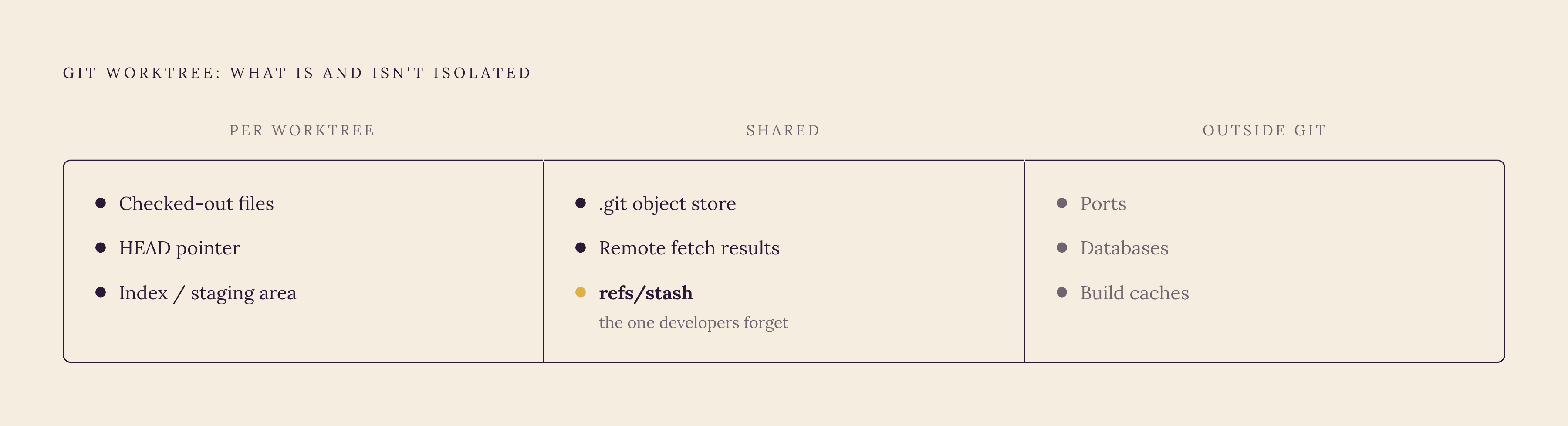
Worktrees isolate files and branches. They do nothing to isolate the operating-system resources sitting underneath a project, and that gap causes most of the frustration the first time someone scales from one agent to several.
Ports are the most immediate case. If two agents each try to start a local dev server on the same default port, the second one either fails outright or auto-increments to the next free port, and at that point it becomes hard to tell which running server belongs to which worktree. The standard fix is to assign each worktree its own dedicated port range, encoded directly in that worktree's.env file, so the Angular dev server, the backend API, and the database each get a distinct, predictable port per worktree, with every server started explicitly on its assigned port. Worktrunk, a CLI built specifically for this workflow, includes a hash_port template filter that computes a unique port for each worktree automatically, removing the need to track port assignments by hand.
Databases carry more risk than ports do, because a port collision fails loudly and a shared database usually doesn't. If two agents in two worktrees are both pointed at the same database instance, a migration run by one can corrupt the schema the other one is relying on, and that corruption can sit undetected for a while before anyone traces it back to its source. A dedicated database per worktree, named to match the branch it belongs to, is the standard answer, with the side benefit of making it obvious later which databases are stale and safe to clean up.
Build caches and test infrastructure raise a related but different problem: not corruption, but contention. Worktrunk takes a different approach to the same problem by using copy-on-write build caches, supported on the APFS, btrfs, XFS, and ReFS filesystems, so multiple worktrees can share already-compiled artifacts without rebuilding them or copying them in full for each worktree.
Stash deserves repeating here because it's easy to forget: refs/stash is shared across every worktree in a repository, not scoped to one. A stash created in one worktree shows up in all the others, and applying it in the wrong one is a realistic mistake, not a hypothetical one. The standing practice for parallel agents is the same one from earlier: skip stash, and commit to the branch instead.
None of this is an argument against worktrees. It's a map of where the boundary of what worktrees solve actually sits, so a team adopting the pattern knows what still needs its own plan.
How first-class tooling absorbed the worktree pattern in 2026
What used to be a git power-user trick is now showing up as a built-in feature in the tools developers already use to run agents, and that shift has lowered the setup cost considerably over the past year.
Anthropic brought native worktree support to the Claude Code CLI in February 2026. On the autonomy side, this gives Claude a direct tool for entering and exiting isolated branches on its own, rather than relying on a developer to set up each worktree by hand before handing off a task.
Augment Code built its macOS orchestration tool, Intent, around the pattern directly as a core structure. Each Space in Intent creates a dedicated git branch and worktree, and specialist agents run in parallel inside those isolated directories. A Coordinator manages the sequence in which work gets merged back together, and only after a Verifier has checked the output against a living spec. The worktree pattern isn't a configuration option somewhere in Intent's settings; it's the structure the whole system is built on.
CodeRabbit's git-worktree-runner takes a more utilitarian approach: a script-based manager that automates creating a worktree per branch, installing dependencies, and setting up the workspace, with editor integration for Antigravity, Cursor, VS Code, and Zed, and support for launching Claude Code, Codex, or Gemini CLI inside the worktree it creates.
Instruction files are converging too. Claude Code version 2.1.277, released September 18, 2026, added fallback support for AGENTS.md project instruction files: when a project has no CLAUDE.md present, Claude Code now reads AGENTS.md instead, and that behavior can be adjusted through /config. In practice, a single AGENTS.md sitting in a repository's root can define task boundaries and off-limits files once, and every agent working in every worktree attached to that repository picks up the same rules at the same time.
Why worktrees make test results trustworthy under parallel agents
The value of all of this comes down to where conflicts get caught. In a shared directory, two agents can each run a test suite that passes, while the combination of their changes breaks something neither one could see on its own, because each was testing a version of the codebase the other had already silently altered. Worktrees don't eliminate that risk, but they move the moment of detection to a place where it can actually be caught: merge time, using git's ordinary tooling, against commits rather than against whatever happened to be sitting in a shared file seconds earlier.
A passing test run inside a worktree reflects a known, stable branch state, because no other agent can write into that directory while the tests run. When two agents' branches are merged afterward, any real conflict between their changes appears as a visible, specific git conflict instead of a test that silently passed on each side while hiding a problem that only exists once both changes exist together. That difference, between a conflict surfaced in a diff and a conflict buried in a shared working tree, is what makes a passing test result under parallel agents something a developer can actually trust.